

How image recognition could change the way people experience cultural spaces
We're exploring image recognition as a way to help people find out more about the things they're looking at, starting with museums and galleries but with potential across the wider cultural sector. This article covers why we think it's worth investing in, how we've approached it, and what we've learned so far.
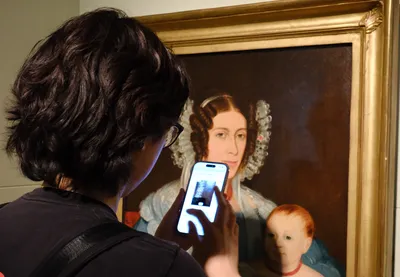
A visitor holds up their phone to test object recognition in a real gallery space.
The concept
Museums often rely on panels and labels to tell the story of what’s in front of you, and for most visitors that’s still a valuable part of the experience. Some museums have also explored removing labels completely, for reasons such as letting the objects speak for themselves or keeping galleries free of text that can date quickly, and that makes the question of where visitors go to find out more even more important. Whether a gallery keeps its labels, reduces them or takes them away, there’s an opportunity to add something alongside them, a way for people to follow their own curiosity a bit further when something catches their eye, without needing to track down the right label or read past text that doesn’t interest them. That’s the idea we’ve been exploring with image recognition.
The concept itself is straightforward, you see something in a gallery that interests you, you take a photo of it on your phone, and the system matches it against a reference library and tells you what you're looking at.
We see this as a way to add a layer to the experience rather than replace what's already there, and getting that balance right has shaped almost every decision we've made while exploring it.
We've invested in developing this through our innovation co-fund, because we believe the opportunity here goes well beyond any single project.
Why not just buy something off the shelf
There are white label products already on the market that do a version of this and they work, but they give every organisation the same experience wrapped in different branding. What we heard, both from our own research and from conversations with people working in the sector, is that organisations want something that reflects how they work. Something that can be tied into their own collections systems, their own way of grouping and describing objects, their own sense of how a visit should feel. That's a harder problem to solve than a plug in widget, but it's also a much more interesting one, and it's the gap we set out to explore.
Finding out if it was even possible
Before we could build anything properly, we needed to know if the underlying idea actually worked. An early prototype gave us a first look, and it was decent on paper, but a simple test exposed the problem straight away. Two objects sitting side by side, similar in shape and colour, and the system could not reliably tell them apart. This was an important factor, because museums are full of objects that look similar at a glance but are completely different once you know what you're looking at.
So we looked at the models available for this kind of image matching and tested two of the strongest ones against each other, one built on Meta's approach to visual similarity and one built on Google's approach to interpreting shapes and features. Since they worked in slightly different ways, we wondered whether combining them would give better results than either on its own, so we tried that too.
We took the models into a real gallery space, photographed around fifty objects across a range of phones, old and new, expensive and budget, and built a proper dataset out of it. The results were strong, in the low to mid nineties percent for accuracy, with one of the two models edging ahead slightly. Combining them didn't add much on top of that. It was a useful thing to learn, because it meant we could keep the system simpler than we'd expected.
The challenge we didn't expect
The bigger models that gave us that accuracy were also slower, taking up to eight seconds to respond instead of one.
The usual way to speed this up is to run the models on a GPU, a specialist server built to carry out a very large number of calculations at the same time, which brought response times down to fast enough for visitors to notice no delay. While we were weighing up what that would cost to set up and to run throughout opening hours, when it would only be handling a few requests a minute, a fellow Torchboxer flagged a specialist provider whose infrastructure is built specifically for this kind of image lookup at scale. Switching to that approach gave us the same speed at a fraction of the cost, and without us needing to run and maintain a GPU ourselves. It also suits how a venue works, because we only use capacity when visitors are making lookups instead of keeping a machine running all day.
The tools in this area are changing quickly, and part of the value of testing early is being able to adopt a better option when one comes along.
Why we had to build the reference library by hand
Most museums already have professional photography of their collections, but it's studio photography. Clean lighting, white backgrounds, nothing like what a visitor's phone actually sees through the glass of a display case in a dimly lit gallery. Matching a real photo against a studio shot just doesn't work well, so we had to build a reference library from images taken in the actual space, under the actual conditions visitors will encounter.
That's also an ongoing job rather than a one off task, as large collections are often still being placed and rearranged right up to opening. So we built a simple way for staff to photograph an object and upload it through the same content system they already use (in this case Wagtail CMS), linking it straight to that object's record.
Cross device testing was also really important, as phones capture images differently, and we wanted the reference library to reflect the spread of devices people would be using, not just the newest handset on the market.
What we're learning about how people behave
Our research revealed that people are forgiving of a system that fails once but if it fails a second time, most give up and don't try again. That put a clear bar under the level of accuracy we needed, but it also pushed us to think beyond the technology itself. What happens if someone's phone can't connect to a venue's WiFi? What happens if they're in a part of the building without a signal? You can get the recognition itself working close to perfectly, but if the surrounding experience falls over, none of that matters. It's a reminder that this only works as one part of a much bigger picture, not a feature you can bolt on and forget.
What's proving hardest right now isn't really an image recognition problem anymore, it's become more of a data problem. Some objects in a collection make sense to look up individually. Others, a case of related items or a set of similar pieces, only make sense as a group, and the system needs to understand and respect that structure rather than trying to identify every single item on its own. On top of that, people photograph things in ways that are hard to predict. Some zoom right in on a detail, others try to capture an entire display in one shot. Designing for that range of behaviour is an ongoing piece of work.
A broader opportunity than object labels
We're already exploring the tool for wayfinding, letting someone scan any object near them to work out where they are on a map, which avoids the cost and complexity of GPS tracking or a building full of beacons. There are also potential benefits for accessibility, turning a photo into a spoken description of what's in front of someone rather than relying on a written panel. And for curators working with large, inconsistently catalogued collections, the same matching technology could help surface visually similar objects automatically, giving them a starting point instead of working through a collection one item at a time.
We believe the potential reaches well beyond museums. It could be for a science festival that runs for a single week each year, with a different layout and different exhibits every time. Or a wildlife or heritage site running a themed family trail over several weeks or months, built around finding hidden characters or clues scattered through the grounds. An app that recognises what you've found as you go, rather than relying on a paper map and a tick box, could make that experience considerably more engaging, and it's the same underlying technology doing the work.
There's already an appetite for this kind of phone based trail in the sector, and some venues have built versions of it using physical markers rather than image recognition, where visitors scan a code or a tag placed at each stop to unlock a scene or an activity. That approach works well, but it depends on a marker being placed, found and scanned correctly every time, and it's usually built for a single, fixed experience. Image recognition removes that dependency as there's nothing to place or maintain, and the same underlying system can be pointed at wayfinding, accessibility, cataloguing or a trail, rather than being built for just one of those things.
Giving it a go
At a recent company away day, using the groundwork already laid for this project, it took very little time to put together a working demo that people could try for themselves. It's a good sign when a piece of technology is straightforward enough that people across a business, not just the team building it, can pick it up and start experimenting.
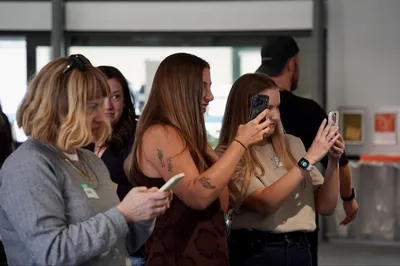
Some of the Torchbox team competing to win the Torchbox Treasure hunt during our latest company day.
We're still testing, still learning, and there's more to share on the results themselves in a follow up piece. But the early signs, and the response from everyone who's tried it, have given us real confidence that this is worth the investment.
More
-

Why your usability testing playbook doesn't work on AI, and what to use instead
Cassandra Christodolo Senior User Researcher
-
What our Paul Mellon Centre research revealed about digital journeys for galleries, libraries, archives and museums
Cassandra Christodolo Senior User Researcher
- See more posts
