
Wagtail Multi-sites: A practical guide to getting it right
There's a moment that'll be familiar to many digital teams. You've got a well-built Wagtail site, it's humming along nicely, and then someone asks: "Could we spin up another site on this?"
Maybe it's a sister brand, a regional variant, a microsite for a campaign. The answer, technically speaking, is yes, Wagtail has great multi-site support baked in. But the more useful question isn't can you, it's should you.

Wagtail's multi-site feature is one of those capabilities that sounds immediately appealing. One codebase, multiple sites, shared infrastructure. But like most architectural decisions, the appeal of the idea and the reality of living with it are two different things.
In this post, we'll walk through how multi-sites actually work under the hood, lay out the advantages they offer, and be honest about the complications that tend to emerge over time, from shared code complexity and governance headaches to theming overhead and rising support costs. By the end, you should have a clearer picture of whether multi-sites are the right fit for your situation, and what the alternatives look like if they're not.
What are Wagtail multi-sites, and how do they work?
Wagtail's multi-site feature lets you run multiple websites from a single Django project and a single database. Each site is defined in the CMS via Settings > Sites, where you map a hostname and port to a root page in the page tree. From that root page down, each site has its own content hierarchy, its own home page, its own navigation, its own pages.
Under the hood, Wagtail uses Django's Sites framework as a foundation but extends it significantly. The Site model in wagtail.models stores the hostname, port, root page, and an is_default_site flag. When a request comes in, Wagtail resolves it by matching the host header against the site table and serving pages relative to that site's root. The URL routing is relative, /about/ on site-a.com and /about/ on site-b.com are entirely separate pages sitting in separate branches of the same page tree, as illustrated. If Wagtail cannot match a host to a site, it will fall back to the default site, set with is_default_sitea
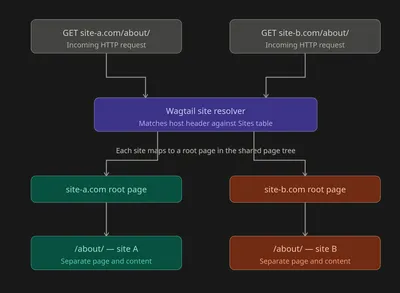
Snippets, images, and documents in Wagtail's media library are shared across all sites by default, which is often very useful, but worth keeping in mind. Custom page models, template logic, and StreamField blocks are all shared at the code level, because they come from the same codebase. If you've defined a HeroBlock or a NewsPage model in your codebase, every site in the project has access to it.
For routing, serving, and caching, your infrastructure just needs to point multiple domains at the same application. One Heroku app, one set of dynos, one Redis cache, serving several sites simultaneously.
The case for multi-sites
You get a head start
The most compelling argument for multi-sites is the one that usually kicks off the conversation: you've already done the work. Your page models are built, your StreamField blocks are configured, your deployment pipeline is solid, your editors know the CMS. Spinning up a new site inside that existing project means the new site inherits all of that maturity immediately. No scaffolding a new project from scratch, no rebuilding the image library, no re-explaining to editors why the rich text field works the way it does.
For organisations managing a portfolio of related sites, think a charity with multiple campaign properties, a university with faculty microsites, or an agency managing several client sites on behalf of one organisation, this is a meaningful reduction in time-to-launch.
Shared hosting keeps costs down
A multi-site setup typically means one application server, one database, one cache layer, one CDN configuration. You're not paying to run four separate infrastructure stacks for four sites. For smaller sites that don't have individual traffic volumes to justify their own resources, this is a practical cost saving.
It also simplifies ops. One deployment process, one set of environment variables to manage, one place to look when something goes wrong at the infrastructure level.
Improvements rise with the tide
When you upgrade Wagtail, improve your search indexing, optimise a slow query, or add a new reusable StreamField block, every site in the project benefits immediately. If you've put real work into accessibility, performance, or security across the codebase, all your sites inherit those improvements at once. There's no risk of one site running on an old, unpatched version because it was forgotten during an upgrade cycle.
The case against multi-sites
Shared code means shared complexity
Here's the flip side of that inherited maturity: when you onboard a new developer to work on Site B, they're not working on a standalone project. They're working inside a codebase that was originally built around Site A, possibly with years of accumulated decisions, abstractions, and edge cases baked in. Getting up to speed takes time, and the blast radius of a mistake is larger than it would be in an isolated project.
If the original codebase is complex, and complex Wagtail projects can get genuinely complex, every new site you add to it not only inherits that complexity, it adds to it.
None of this is a reason to avoid a multi-site setup, it's a reason to go in with eyes open. Establishing clear contribution guidelines, good code documentation, and a thorough onboarding process for new developers goes a long way. The complexity is manageable; it just needs to be actively managed rather than assumed away.
Changes to site A can break site B
This is the one that tends to catch teams out. Because all sites share the same codebase and the same database schema, a migration written for Site A's new feature affects the database for every site. A change to a shared page model to support a new layout on Site A could have unintended consequences for Site B's templates. A refactor of a shared StreamField block needs to be tested across every site in the project, not just the one you were thinking about.
This applies at a granular level too. If you add a new field to a shared StreamField block, say, an optional caption field on your ImageBlock, that field now appears in the editor interface for every site using that block. Any template rendering that block needs to handle the new field. It sounds minor until you're troubleshooting a visual regression on Site C because a block was updated for Site A's rebrand.
The best insurance here is a solid testing strategy, both automated functional tests and visual regression tests. Tools like Playwright make it possible to run cross-browser checks across all your sites as part of a CI pipeline, catching unintended breakage before it reaches users. The keyword is all, in a multi-site project, your test suite needs to cover every site in the project, not just the one you're actively working on. That's a higher implementation and maintenance cost than a single-site project would require, but it's the most reliable way to keep shared changes from becoming someone else's production incident.
Theming and styling: shared by default, divergent by necessity
When you first add a new site, it will look a lot like the original, same templates, same component styles, same CSS. That might be acceptable for a closely related brand, but in my experience, it rarely is… most of the time you want each site to have its own distinct visual identity.
That means writing and maintaining site-specific theme overrides: separate stylesheets, conditional template logic, custom component variants. None of that is particularly difficult, but it is work, and it's ongoing work. Every time a shared component is updated for one site, you need to check how that change lands across all your theme variants. The component reuse that felt like an advantage at the start quietly becomes a maintenance obligation.
This is a well-understood problem and there are established patterns for handling it cleanly. Template inheritance, CSS custom properties scoped per-site, and a clear naming convention for site-specific overrides all help keep things organised. The overhead is real, but with the right approach upfront it rarely becomes unmanageable. Getting the theming architecture right at the start of a multi-site project is one of the most valuable things a team can do.
Dependency entanglement
Third-party integrations and package dependencies don't respect site boundaries. If Site A requires a particular version of a package, and Site B would benefit from a different version, you have a problem. You can't run different dependency trees for different sites in the same project, you have one requirements definition, and everyone lives by it.
This becomes most apparent when sites have meaningfully different technical needs, or when one site is pushing the project in a new direction the others weren't designed around.
In practice this is rarely a dealbreaker, particularly for sites that are related in purpose and built around a similar feature set. The situations where it becomes a real problem tend to signal something deeper, that the sites in question probably shouldn't be sharing a codebase at all. Treating dependency friction as an early warning sign is more useful than trying to engineer around it.
Governance: one key opens every door
It’s rarely understood in the planning phase, but when testing your new multi-site setup you’ll notice that, in Wagtail, a superuser or admin account has access to the CMS across all sites in a multi-site project. An editor who manages Site A's content and has full CMS access can, by default, also see and edit content on Site B. Earlier I mentioned media like images and documents being shared - that’s relevant when it comes to governance too; a publisher of a multi-site would have access to all the images and documents on all sites.
There are ways to work around this, image buckets, permission policies on SnippetViewSet, careful use of Wagtail's page-level permissions, and custom code to restrict the admin UI. But none of it is automatic, and none of it is trivial.
For organisations where strict content separation between sites is a requirement, different clients, different editorial teams, different governance structures, this is a real architectural concern, not just a UX inconvenience. It's worth raising early in the conversation, before the infrastructure decision is made. The worst outcomes tend to happen when governance is treated as an afterthought and retrofitted onto a live project.
Growing support costs
A single-site codebase has a natural ceiling on its complexity. A multi-site codebase doesn't. As more sites are added, each with their own content requirements, editor quirks, integration needs, and bug history, the codebase grows, and so does the cognitive overhead of supporting it. Issues become harder to isolate. "Is this a Wagtail bug, a shared model bug, or a site-specific theme bug?" can take longer to answer than it should.
For teams paying for support, this is worth pricing in carefully. The economics that made multi-sites attractive at the start can quietly erode as the project ages and grows.
There’s a lot to be said for the separation of workloads and budget here at the business level too: being able to channel funds to specific sites, main or multi, provides a more transparent audit trail of funds. If a small multi-site is costing you more to work on than the value it’s returning, you’d want to know.
The mitigation here is transparency. Being explicit about the shared nature of the codebase when scoping support, building in regular code health reviews, and keeping a clear picture of which sites are actively driving complexity all help. A well-run multi-site project doesn't have to become an unruly one, but it benefits from someone keeping an eye on the overall shape of things, not just the individual tickets and features.
So, should you?
Multi-sites are a good tool for the right use case. If you're managing a family of closely related sites with similar content structures, aligned editorial governance, and a stable well-understood codebase, the benefits are real and the added complexity is manageable.
But multi-site is not the only option, and for many situations it’s important to be aware that it may well not be the right one. Sometimes a ‘microsite’ model can work, where single ‘landing’ style pages are created, styled differently, and new URLs can be pointed at these pages directly. This works well for things like campaigns and appeals.
Before making the decision, consider the edge cases, specifically when adding and changing fields and page models… how will you understand the scope of the unintended trickle-down impact that you might have on the other multi-sites hosted, and the main default site? That new heading field you’ve added might not look right elsewhere when used… how will you know?
Multi-sites aren't a bad choice; they're just a choice with consequences that compound over time. If your sites are closely related, your team is familiar with the codebase, and governance isn't a concern, they're a perfect solution. If any of those conditions don't hold, you'll likely save yourself time and money by going separate from the start. The infrastructure saving rarely outweighs the support cost of a codebase that's grown beyond what anyone fully understands.
Looking for support with anything we've outlined above?
More
-

Why your usability testing playbook doesn't work on AI, and what to use instead
Cassandra Christodolo Senior User Researcher
-
Researching the probabilistic product: user research in the age of AI
Cassandra Christodolo Senior User Researcher
- See more posts